Build with StatpadTypeScript SDKSwiftUI
A live NFL scoreboard in SwiftUI, and the small server that holds the key
A Node server on @statpad/sdk holds the Statpad key and one stream subscription, and a SwiftUI app resumes from it by seq, tested against a recorded Bills at Vikings game.
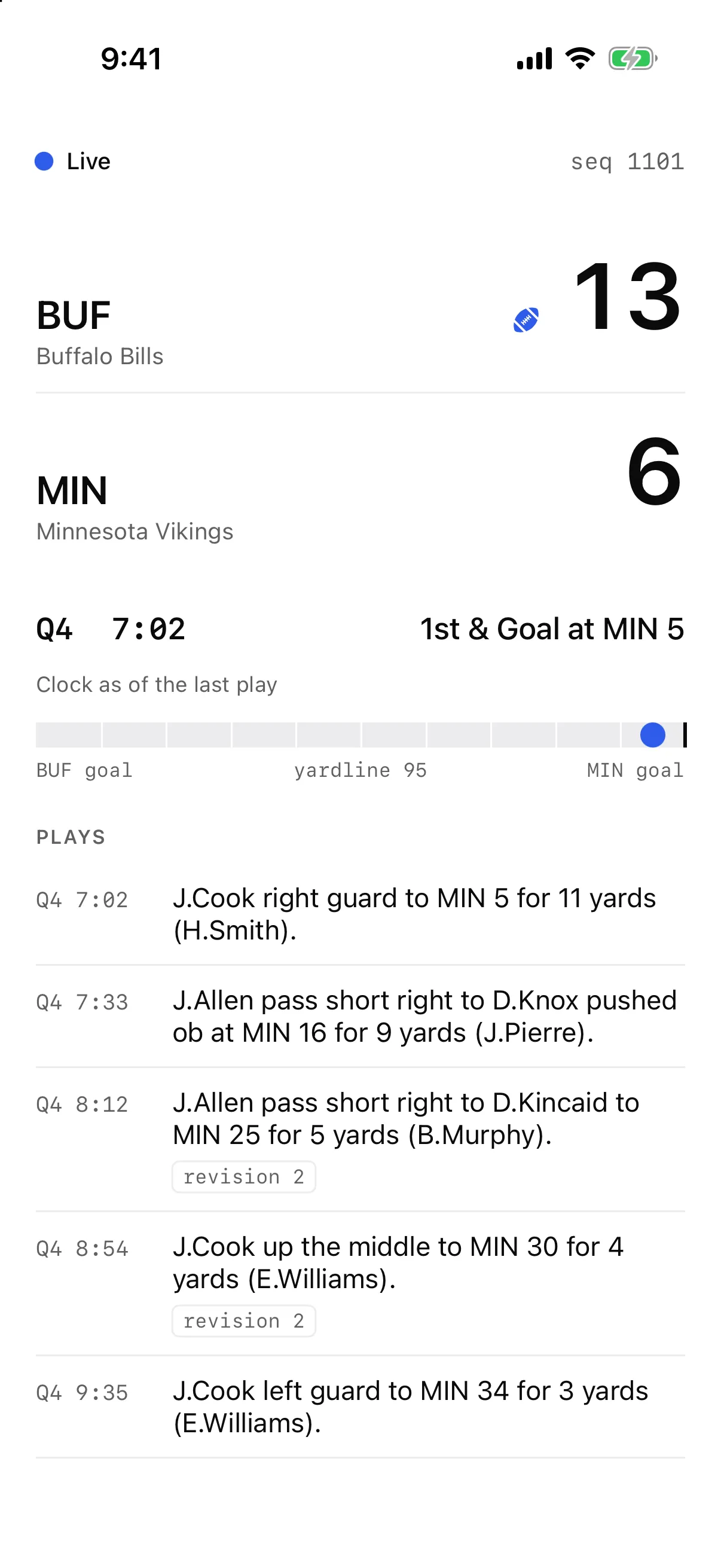
With 7:02 left in the fourth quarter of Bills at Vikings on November 9, Buffalo had 1st and goal at the Minnesota 5, up 13–6. Statpad's journal for the game stood at seq 1101. Say a phone loses signal right there and comes back two minutes later. The changes it missed don't arrive in the order a scoreboard wants. Seq 1104 sets the score to 19–6. The play that explains it, "J.Cook up the middle for 5 yards, TOUCHDOWN.", is seq 1106. At 1111 the same play arrives again as version 2, with "T.Bass extra point is GOOD" added to the description.
An app that draws each change as it lands shows 19–6 with no touchdown on screen, then lists the touchdown twice. This post builds a SwiftUI scoreboard that never renders partway through a message and lists each play once, plus the small Node server that keeps the Statpad key off the phone. Three rules do the work:
- The server passes Statpad's seq through as the id of each server-sent event, so the phone resumes with
Last-Event-IDthe same way the server resumes Statpad. - Both hops apply each message in one step, so nothing renders partway through a message.
- The app keys plays by
entity_id, so a revision replaces its row.
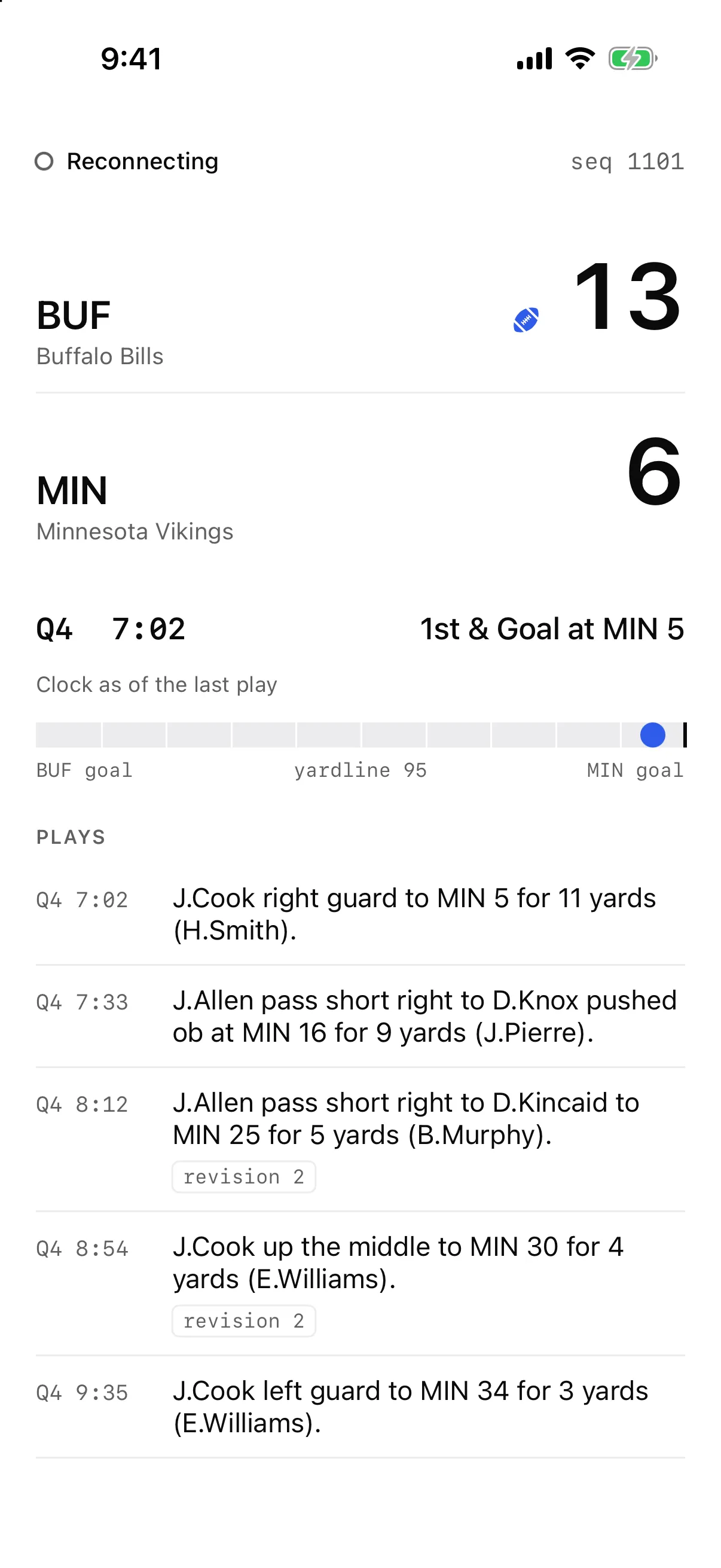
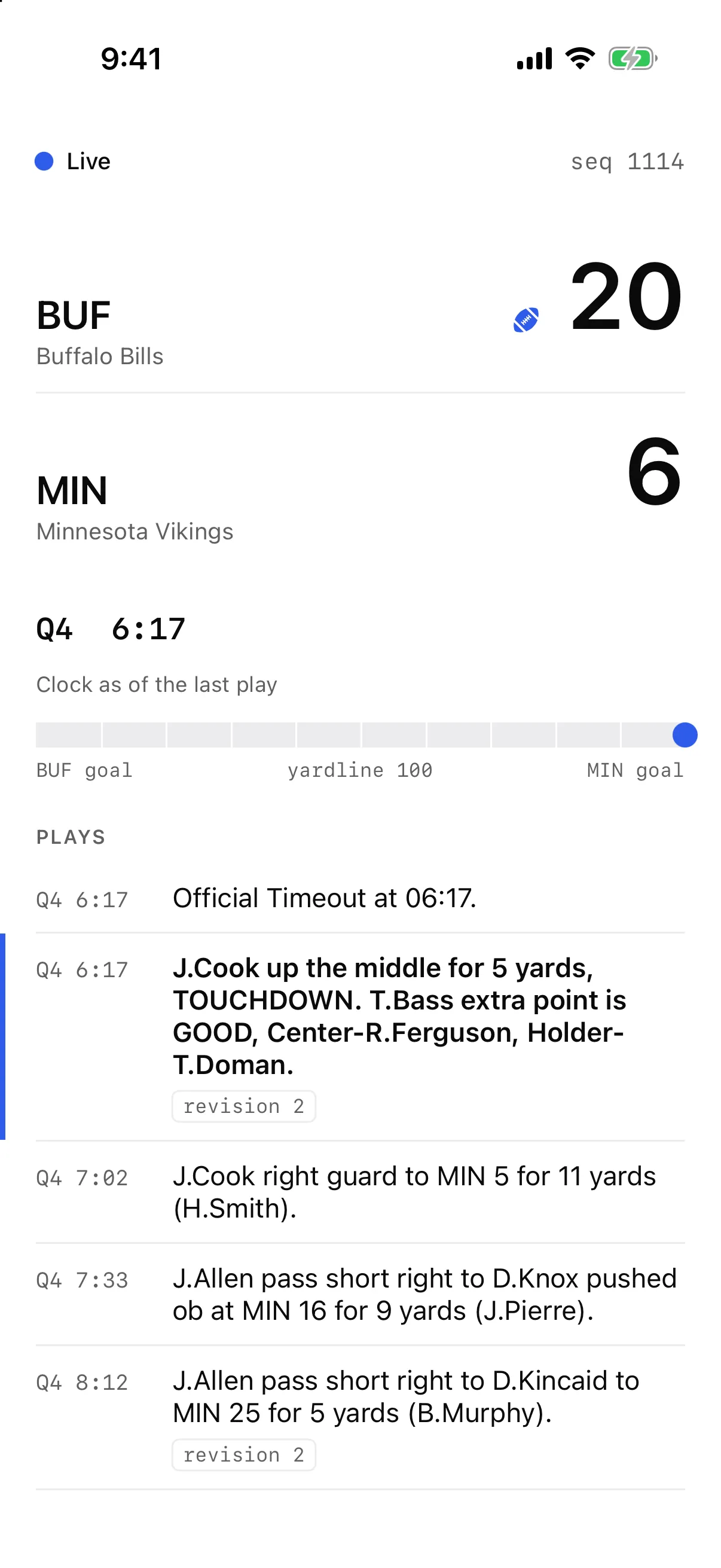
The screenshots at the top of this post and the logs below come from replaying the recorded game at statpad.dev/samples through the server. The left phone is the board at seq 1101, the middle one is the phone cut off, and the right one is the board after it reconnected.
Why the phone can't hold the key
The SDK README warns that "a key shipped in a web page or mobile app is readable by anyone who opens it." CORS does nothing for a native app, and the stream gateway doesn't check origins either. Its source has the comment "Keys travel in the request, never in a cookie, so any origin may connect."
Capacity is the second reason. The limits in Statpad's plans are per account and shared by every key. Pro allows 5 WebSocket connections, so the sixth phone that opens its own socket gets closed with code 4008. Polling is worse. The game ran 3 h 10 min from the first play (01:16:32Z) to the last (04:27:11Z). If 1,000 phones each polled getGame every 10 seconds, they would send 1,144,000 requests. That is more than seven times Pro's 150,000 monthly requests, sent at 100 a second against a sustained limit of 10.
One server on the stream reads the game once and then holds one socket. The stream counts one request for the subscribe and one for each change it delivers, about 1,300 for an NFL game. The Developer plan has no streaming, so there the same server polls listGameChanges every 5 seconds. That comes to about 2,290 requests for the game, however many phones are watching. The left half of the diagram has each phone holding the key. The right half is the setup in this post.
The server
The server is about 340 lines of TypeScript in four files. It uses @statpad/sdk 0.1.1 for REST and ws for the stream, because the SDK README says "This SDK doesn't include a stream client yet." With ws the key travels in the Authorization header. The spec also accepts an api_key query parameter, which exists for browsers.
On start the server calls statpad.games.getGame, which returns the game, its live state, both teams and the seq the response reflects. Then it pages through statpad.playByPlay.listPlays for the plays so far. It resumes from the lower of the two seqs, so a change that lands between the two reads is applied again instead of skipped. Then it opens wss://stream.statpad.dev/v1/stream, waits for welcome and subscribes with that seq as the resume point:
    const subscribe = () => {
      log(`subscribe ${stream} resume after ${hub.seq}`);
      ws.send(JSON.stringify({ type: 'subscribe', id: 'g1', streams: [stream], resume: { [stream]: hub.seq } }));
    };
The AsyncAPI spec names this handoff: "For a game stream, reading the game over REST and resuming from the seq it returns works too." Every reconnect sends the same message with the last seq the server applied. That covers a 1001 close when the gateway restarts and three missed heartbeats (heartbeat_seconds is 5). A slow_consumer error gets the same resubscribe. A resync_required error means the seq is older than Statpad keeps, so the server reads the game and its plays again, replaces everything it held and resumes from the new seq. If that read fails, the server closes the socket and reconnects with the same backoff, still at its old seq, so the gateway answers resync_required again until a read succeeds. A read can also outlive its socket. Each read gets an AbortController, and a close, a newer read or a stop aborts it. An aborted read never reaches the hub, so a slow read from a dead socket can't roll the hub back after a newer one has landed. A 1008 close means the key has no streaming access, and the server stops.
Each upsert carries the entity's full state, so applying one means replacing what the server holds under entity_type and entity_id. A delete carries a tombstone, so the hub removes the entity and forwards the delete. The hub drops the types a scoreboard doesn't draw, such as rosters, player stats and drives. That leaves 591 of the game's 1,277 changes. It keeps the last 2,000 for phones that come back:
  // One changes message from Statpad, applied whole and forwarded as one event.
  apply(changes: Change[]) {
    const fresh = changes.filter((c) => c.seq > this.seq);
    if (fresh.length === 0) return;
    if (fresh[0].seq !== this.seq + 1) throw new Error(`gap: holding ${this.seq}, got ${fresh[0].seq}`);
    const kept = fresh.filter((c) => KEEP.has(c.entity_type));
    for (const c of kept) {
      const key = `${c.entity_type}:${c.entity_id}`;
      if (c.op === 'delete') this.entities.delete(key);
      else this.entities.set(key, c);
    }
    this.seq = fresh[fresh.length - 1].seq;
    this.journal.push(...kept);
    if (this.journal.length > JOURNAL_CAP) {
      this.journalFrom = this.journal[this.journal.length - JOURNAL_CAP - 1].seq;
      this.journal = this.journal.slice(-JOURNAL_CAP);
    }
    if (kept.length === 0) return;
    const event: HubEvent = { type: 'changes', seq: this.seq, data: kept };
    for (const listener of this.listeners) listener(event);
  }
The phones get one route. Each event's id is the seq of the last change it covers. A request with Last-Event-ID gets the changes it missed in one event. A first request, or one from further back than the journal reaches, gets a snapshot:
    const header = req.headers['last-event-id'];
    const missed = typeof header === 'string' ? hub.since(Number(header)) : undefined;
    if (missed) {
      if (missed.length > 0) send('changes', hub.seq, missed);
      log(`phone resumed after ${header}: ${missed.length} changes, now at ${hub.seq}`);
    } else {
      send('snapshot', hub.seq, hub.snapshot());
      log(`phone connected${header ? ` from ${header}` : ''}: snapshot at ${hub.seq}`);
    }
A resync goes to phones that are already connected, too. hub.load replaces what the hub held and sends it to each of them as a snapshot, which LiveFeed applies the same way as the first one, by clearing the store and loading it. Without that, a phone with nothing new to fetch would keep the old score, and plays Statpad had since revised or deleted, until it reconnected:
  // Authoritative state from a game read (getGame and listPlays, or game.json in replay).
  // It replaces everything the hub held, and every connected phone gets it as a snapshot.
  load(seq: number, entities: Entity[]) {
    this.entities = new Map(entities.map((e) => [`${e.entity_type}:${e.entity_id}`, e]));
    this.seq = seq;
    this.journal = [];
    this.journalFrom = seq;
    const event: HubEvent = { type: 'snapshot', seq, data: this.snapshot() };
    for (const listener of this.listeners) listener(event);
  }
Here is the route from curl, with the replay held at 1101 and then again after it reached 1114. The lines are cut at 120 characters:
$ curl -sN localhost:8787/games/01a1d60f-67be-7bdd-83f4-53286521d9bb/events | cut -c1-120
event: snapshot
id: 1101
data: {"seq":1101,"entities":[{"entity_type":"team","entity_id":"01a1d60f-67be-7bde-8a86-89128cd484ca","version":1,"payl

$ curl -sN -H "Last-Event-ID: 1101" localhost:8787/games/01a1d60f-67be-7bdd-83f4-53286521d9bb/events | cut -c1-120
event: changes
id: 1114
data: [{"at":"2026-11-13T17:58:32.672396Z","entity_id":"01a1d60f-67be-7bdd-83f4-53286521d9bb","entity_type":"live_state"
Replay mode
With --replay, the server reads changes.ndjson and game.json from statpad.dev/samples/nfl-bills-at-vikings, or from a local copy, and feeds them into the same hub. The app can't tell the difference. Two things in the recording matter.
The first is at. The schema defines it as "When the change was recorded", and this journal was recorded in one pass on November 13, so every at falls between 17:58:16 and 17:58:35. A replay paced by at plays the whole game in 20 seconds. This one waits for each play's wall_clock instead, scaled by --speed.
The second is that changes sharing an at came from one database call. The journal's append_changes function stamps all of a transaction's changes with one clock_timestamp(), so the replay groups by at and gets 432 messages for the game. Seqs 1104 to 1107 (score, drive, touchdown play, live state) form one of them.
  // append_changes stamps one transaction's changes with one clock_timestamp(), so equal
  // `at` values mark the changes Statpad committed together.
  const batches: Change[][] = [];
  for (const c of changes) {
    if (batches.at(-1)?.[0].at === c.at) batches.at(-1)!.push(c);
    else batches.push([c]);
  }
Grouping by at means the replay never splits a transaction across two messages. The live gateway can. A subscriber that catches up from the journal gets pages of 500 changes cut by seq, wherever a transaction happens to end. Resume this recording after seq 604 and the first message holds 605 to 1104. It ends on the 19–6 score, and the Cook touchdown at 1106, which shares that score's at, comes in the next message. So during a live catch-up the board can show a score for one message before the play that explains it. A server test reproduces this against a stand-in gateway that pages the same way.
The app
The app targets iOS 17. A ScoreboardKit package holds the models, the store and the event reader, and two SwiftUI files draw the board.
The easy mistake is reading the stream with URLSession's bytes(for:).lines. That sequence skips empty lines, and in server-sent events an empty line is what ends an event. With Swift 6.4 on macOS 27, a six-line file with two empty lines came back as four lines. So the reader splits the bytes itself:
                for try await byte in bytes {
                    if byte != UInt8(ascii: "\n") {
                        line.append(byte)
                        continue
                    }
                    let text = String(decoding: line, as: UTF8.self)
                    line.removeAll(keepingCapacity: true)
                    if text.isEmpty {
                        if !event.data.isEmpty { continuation.yield(event) }
                        event = ServerEvent()
                        continue
                    }
LiveFeed reconnects with backoff, and every request after the first carries the last seq the store applied:
            var request = URLRequest(url: url)
            if store.seq > 0 { request.setValue(String(store.seq), forHTTPHeaderField: "Last-Event-ID") }
The store applies one event's changes in one synchronous call on the main actor. A for try await loop can suspend between events, and SwiftUI can render whenever it does. If the server sent each change as its own event, the board could render 19–6 with the 11-yard run still listed as the last play after every catch-up, not only the one at 604. With one event per message and one call per event, no render lands inside a message. A delete's payload is a tombstone, so the decoder checks op before it decodes an entity, and the store removes the entity by type and id:
    public func apply(_ changes: [Change], through seq: Int) {
        for change in changes {
            switch change.payload {
            case .game(let game): self.game = game
            case .liveState(let live): self.live = live
            case .team(let team): teams[team.id] = team
            case .play(let play): plays[play.id] = play
            case .tombstone: delete(change.entityType, change.entityId)
            case .other: break
            }
        }
        self.seq = seq
    }

    private func delete(_ entityType: String, _ id: String) {
        switch entityType {
        case "game" where game?.id == id: game = nil
        case "live_state" where game?.id == id: live = nil
        case "team": teams[id] = nil
        case "play": plays[id] = nil
        default: break
        }
    }
Two parts of the board follow the schema. The clock doesn't tick, because clock_running is null in all 306 live_state changes in this game, and the schema says football feeds "have no running flag, so it is null there; use clock_seconds, which updates as plays post." The board shows "Q4 7:02" with "Clock as of the last play" under it. The field bar follows yardline, "0-100 from the possessing team's own goal line". With Buffalo in possession, 95 is the Minnesota 5. Add the 5 yards to go and you reach 100, the goal line, which is why the board reads 1st & Goal.
The reconnect in the Simulator
The Simulator has no airplane mode, so for this run the app talked to the server through an 11-line TCP proxy, scripts/flaky-proxy.mjs. Stopping the proxy cuts the phone off and leaves the server running. The replay held at 1101 while the app connected. Then the proxy stopped, the replay ran on to 1114 at 20 times game speed, and the proxy started again. While it was down, the board said Reconnecting at seq 1101 and 13–6.
When the proxy came back, the app's next request carried Last-Event-ID: 1101 and got one event with 9 changes. The board went to 20–6 with the touchdown listed once, at revision 2, and the official timeout at 6:17 above it.
This is the server's log from that run:
21:07:45.374 listening on :8787, game 01a1d60f-67be-7bdd-83f4-53286521d9bb
21:07:45.381 replay holding at seq 1101 for 25 s
21:07:50.005 phone connected: snapshot at 1101
21:07:56.161 phone disconnected at 1101
21:08:12.436 seq 1107: 19-6 play v1 J.Cook up the middle for 5 yards, TOUCHDOWN.
21:08:12.437 seq 1112: 20-6 play v2 J.Cook up the middle for 5 yards, TOUCHDOWN. T.Bass extra point is GOOD, Center-R.Ferguson, Holder-T.Doman.
21:08:15.988 seq 1114: play v1 Official Timeout at 06:17.
21:08:15.989 replay stopped at seq 1114
21:08:28.018 phone resumed after 1101: 9 changes, now at 1114
The diagram has every change from 1101 to 1114. The brackets join changes with the same at, the blue dots are the 9 changes the phone received, and the grey rows are the ones the server drops.
Tests
The six Swift tests run with swift test against the recorded journal. Applying all 1,277 changes gives the same game and live state as game.json (complete, 23–6, seq 1277, 187 plays). Applying everything twice gives the same state as applying it once, which is the README's "applying the same change twice is harmless" checked on real data. Applying 1 to 1101 matches game-live.json, and continuing from 1102 ends where one unbroken run ends. After 1114 there is exactly one touchdown row, at version 2, with the extra point in it. The recording has no deletes, so the fifth test applies a hand-written tombstone for that touchdown and checks the row is gone. The sixth starts a store at 1114 and loads a snapshot at 1277 into it, the way a resync arrives mid-stream. The snapshot leaves the touchdown out, and the store ends at game.json with no touchdown row.
✔ Test everyChangeReachesTheFinalGameRead() passed after 0.023 seconds.
✔ Test aDeletedPlayLeavesTheBoard() passed after 0.024 seconds.
✔ Test theTouchdownIsOneRowWithItsExtraPoint() passed after 0.025 seconds.
✔ Test resumingAfter1101MatchesOneUnbrokenRun() passed after 0.029 seconds.
✔ Test aSnapshotMidStreamReplacesEverything() passed after 0.029 seconds.
✔ Test applyingEverythingTwiceIsHarmless() passed after 0.029 seconds.
✔ Test run with 6 tests in 1 suite passed after 0.029 seconds.
The server's 13 tests run with npm test. Four cover the hub, including a delete. One holds a phone on the event route at 1101 and 13–6, then runs readGame against a stand-in SDK client that returns game.json and every play but one, and checks that the phone gets a snapshot at 1277 with 23–6 and without that play. The other eight run followStream against a local stand-in for the gateway that follows asyncapi.yaml, serves the recorded journal and pages it 500 changes at a time. It closes with 1001 at 1101 and resumes a subscriber from 604 (the split described above). It answers resync_required with a read that works, a read that fails twice, and a slow read whose socket closes before it finishes while a newer read lands first. It goes silent with heartbeat_seconds set to 1, accepts a socket and never sends welcome, and checks that stop() during a backoff cancels the reconnect. Each time the server reconnects, its subscribe resumes from the right seq:
  [1001] subscribe game:01a1d60f-67be-7bdd-83f4-53286521d9bb resume after 0
  [1001] subscribed (resume) at 0
  [1001] closed 1001, resuming after 1101 in 1000 ms
  [1001] subscribe game:01a1d60f-67be-7bdd-83f4-53286521d9bb resume after 1101
  [1001] subscribed (resume) at 1101
✔ a 1001 close resumes from the last applied seq (1097.2526ms)
When the read fails, the server reconnects and waits twice as long each time, and every subscribe still resumes from 0 until a read succeeds:
  [resync failed] subscribe game:01a1d60f-67be-7bdd-83f4-53286521d9bb resume after 0
  [resync failed] resync failed, reconnecting: Error: getGame: 503 Service Unavailable
  [resync failed] closed 1005, resuming after 0 in 1000 ms
  [resync failed] subscribe game:01a1d60f-67be-7bdd-83f4-53286521d9bb resume after 0
  [resync failed] resync failed, reconnecting: Error: getGame: 503 Service Unavailable
  [resync failed] closed 1005, resuming after 0 in 2000 ms
  [resync failed] subscribe game:01a1d60f-67be-7bdd-83f4-53286521d9bb resume after 0
  [resync failed] subscribe game:01a1d60f-67be-7bdd-83f4-53286521d9bb resume after 1101
  [resync failed] subscribed (resume) at 1101
✔ a resync that fails reconnects with backoff, still at the old seq, and tries again (3038.4443ms)
What Statpad doesn't serve yet
- Score by period.
period_scoresis[]in bothgame.jsonandgame-live.json. To draw a line score, sumpointsover scoring plays byperiodandteam_id. In this game that gives Buffalo 3, 7, 3 and 10 and Minnesota 0, 6, 0 and 0, which adds up to 23–6. - Team logos and colors. A team has
market,nameandalias, so the board uses aliases. - A running football clock. Show
clock_secondsas of the last play. Soccer is different, because Premier League feeds setclock_runningwhile a half is being played.
This server also leaves things out. It follows one game, and its journal lives in one process's memory.
Run it
Download the project from https://statpad.dev/blog/swiftui-live-scoreboard/swiftui-live-scoreboard.zip. It has the server, the Xcode project with ScoreboardKit, and the recorded game. The server needs Node 20 or later, and replay mode needs no key:
unzip swiftui-live-scoreboard.zip
cd swiftui-live-scoreboard/server
npm ci
npm test
npm start -- --replay ../data/nfl-bills-at-vikings --from 1101 --hold 30 --speed 20
In a second terminal, curl -N localhost:8787/games/01a1d60f-67be-7bdd-83f4-53286521d9bb/events shows the events. With STATPAD_API_KEY set and no --replay, the server follows the live stream, and --poll switches it to the Developer-plan loop.
For the app, go back to the folder you unzipped in, run the Swift tests, then open the project in Xcode and run the Scoreboard scheme on an iOS 17 or later Simulator while the server runs:
cd swiftui-live-scoreboard/App/ScoreboardKit
swift test
open ../Scoreboard.xcodeproj
The app connects to http://127.0.0.1:8787 unless SCOREBOARD_SERVER says otherwise.
More from Build with Statpad
- Test that your live client gets a real game rightA six-test node:test file sends all 1,277 changes of a recorded NFL game through your change handler and checks what your app would show at the moments that break live clients.
- Ask Claude about an NFL game while it replays on your laptopA small Node server replays the recorded Bills at Vikings game on localhost. Point @statpad/mcp at it, ask Claude who has the ball, then move the game forward and watch the answer change when replay overturns a fumble.
- A shot map of Manchester United 4–4 Aston Villa in 125 lines of TypeScriptEvery shot in Statpad's Premier League play-by-play has pitch coordinates. This script turns one 8-goal draw into an SVG shot map and a score timeline, and covers the two coordinate traps.
- A fantasy football scoreboard for your Discord channelA first project with the Statpad API. One small Node script scores a fantasy matchup from NFL box scores and keeps a single Discord message up to date through a channel webhook.